

 Português
 Español
 Français




 0
0

 World Cup 2026
 Mobile
add remove
Mobile
add remove  Small Appliances
add remove
Small Appliances
add remove  Large Appliances
add remove
Large Appliances
add remove  Image and Sound
add remove
Image and Sound
add remove  Computing
add remove
Computing
add remove  Gaming
add remove
Gaming
add remove  Health and Beauty
add remove
Health and Beauty
add remove  Networks and Energy
add remove
Networks and Energy
add remove  Consoles, Games and Toys
add remove
Consoles, Games and Toys
add remove  DIY and Garden
add remove
DIY and Garden
add remove  Adapters and Cables
add remove
Adapters and Cables
add remove  SmartHome and Domotics
add remove
SmartHome and Domotics
add remove  House and Decoration
add remove
House and Decoration
add remove  Sports and Mobility
add remove
Sports and Mobility
add remove  Outlet
 Merchandising
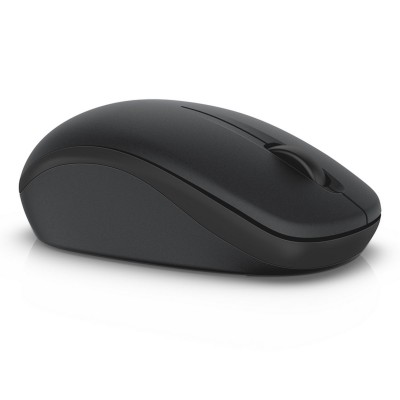
The WM126 Wireless Optical Mouse from Dell offers, with its excellent battery life, all-day wireless performance. Fast and reliable, it can be connected without cables (radio), it provides a clean and tidy worktable without cable tangles
Remove annoying cable clutter with the Dell Wireless Mouse WM126, which offers all the functions of a mouse, just no cable.
Take your business anywhere with the reliable wireless connection of the Dell Wireless Mouse WM 126. You can also connect up to six compatible devices to a single receiver, so you can connect your keyboard and mouse devices wirelessly - at home, at the office or on the road.
Extended battery life of up to a year provides relaxation because they know they are ready to use almost any time.
The ergonomic design that feels good with both hands provides comfortable work. The mouse has three clickable buttons (left, right and center) and a friendly mouse wheel.
You can mouse over the included receiver to connect and start immediately. No additional software or drivers needed. However, if you are using Dell Universal pairing technology and want to connect up to 6 compatible devices to one receiver, please download the necessary software from Dell.com/pair.
Product Details
Wireless Mouse Dell WM126 Black

Battery
Weight & Dimensions
The WM126 Wireless Optical Mouse from Dell offers, with its excellent battery life, all-day wireless performance. Fast and reliable, it can be connected without cables (radio), it provides a clean and tidy worktable without cable tangles
Remove annoying cable clutter with the Dell Wireless Mouse WM126, which offers all the functions of a mouse, just no cable.
Take your business anywhere with the reliable wireless connection of the Dell Wireless Mouse WM 126. You can also connect up to six compatible devices to a single receiver, so you can connect your keyboard and mouse devices wirelessly - at home, at the office or on the road.
Extended battery life of up to a year provides relaxation because they know they are ready to use almost any time.
The ergonomic design that feels good with both hands provides comfortable work. The mouse has three clickable buttons (left, right and center) and a friendly mouse wheel.
You can mouse over the included receiver to connect and start immediately. No additional software or drivers needed. However, if you are using Dell Universal pairing technology and want to connect up to 6 compatible devices to one receiver, please download the necessary software from Dell.com/pair.
Product Details
Wireless Mouse Dell WM126 Black
Battery
Weight & Dimensions